
消息队列

在支付宝小程序中,由于并发数量的限制,同时发送多个请求的话,有可能会造成请求的丢失,因此封装一个消息队列,对超过5条的进行中请求做排队处理。
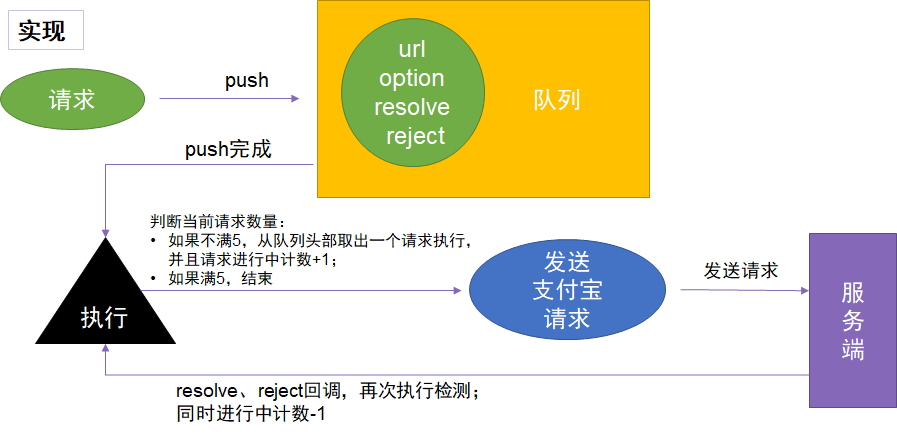
代码实现如下:

1
2
3
4
5
6
7
8
9
10
11
12
13
14
15
16
17
18
19
20
21
22
23
24
25
26
27
28
29
30
31
32
33
34
35
36
37
38
39
40
41
42
43
44
45
46
47
48
49
50
51
52
53
54
55
56
57
58
59
60
61
62
63
64
65
66
67
68
69
70
71
72
73
74
const MAX_COUNT = 5

class Alipay {
static queue = []
static count = 0

// 收到请求,放到队列
static http (options = {}) {
return new Promise((resolve, reject) => {
// console.log('入队')
this.queue.push({
options,
success: (res) => {
resolve(res)
},
fail: (err) => {
reject(err)
}
})
this.walk()
})
}

// 遍历队列,依次发出请求
static walk () {
if (this.count < MAX_COUNT) {
const left = MAX_COUNT - this.count
let min = Math.min(left, this.queue.length)
while (min--) {
// console.log('出队')
let request = this.queue.shift()
this.count++
this.request(request.options)
.then(res => {
request.success(res)
})
.catch(err => {
request.fail(err)
})
}
}
}

// 封装请求
static request (options) {
return new Promise((resolve, reject) => {
my.request({
...data,
timeout,
success: (res) => {
resolve(res.data)
this.count--
this.walk()
},
fail: (err) => {
reject(err)
this.count--
this.walk()
}
})
})
}

static get (options) {
options.method = 'GET'
return this.http(options)
}

static post (options) {
options.method = 'POST'
return this.http(options)
}
}

这样,就实现了一个消息队列,任意时间进行中的请求不会超过5条。

次级队列

实际小程序操作中,有大量的埋点和formId请求,这些请求是用于大数据统计,成功或失败不影响用于体验。但是如果队列中加载了埋点请求,会造成正常的请求等待,影响页面加载速度,进而影响用户体验。因此,我们需要对请求做一个区分,优先推送普通请求。
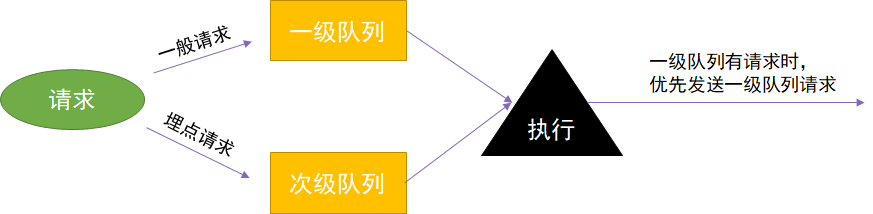
代码实现如下:

1
2
3
4
5
6
7
8
9
10
11
12
13
14
15
16
17
18
19
20
21
22
23
24
25
26
27
28
29
30
31
32
33
34
35
36
37
38
39
40
41
42
43
44
45
46
47
48
49
50
51
52
const MAX_COUNT = 5

class Alipay {
static queue = []
static subQueue = []
static count = 0

// 收到请求,放到队列
static http (options = {}) {
return new Promise((resolve, reject) => {
let inQueue = this.queue
if (options.subQueue) {
inQueue = this.subQueue
}
this.queue.push({
options,
success: (res) => {
resolve(res)
},
fail: (err) => {
reject(err)
}
})
this.walk()
})
}

// 遍历队列,依次发出请求
static walk () {
if (this.count < MAX_COUNT) {
const left = MAX_COUNT - this.count
let min = Math.min(left, this.queue.length + this.subQueue.length)
while (min--) {
// console.log('出队')
let request
if (this.queue.length) {
request = this.queue.shift()
} else {
request = this.subQueue.shift()
}
this.count++
this.request(request.options)
.then(res => {
request.success(res)
})
.catch(err => {
request.fail(err)
})
}
}
}

锁定队列

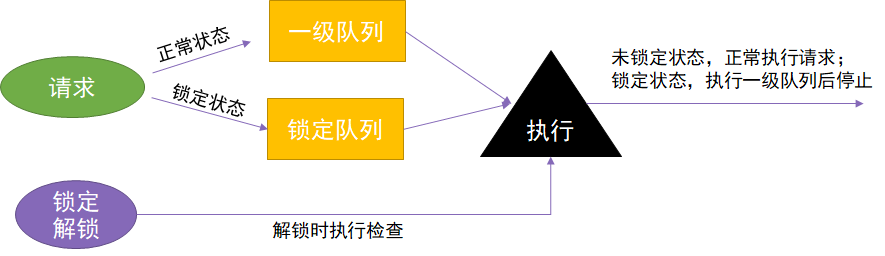
实际开发中,大部分请求都需要一个前置请求完成,就是获取uid。假设用户都从首页进入,那么只需在首页先获取uid,在回调中进行其他操作即可。但实际情况是,小程序的很多页面都可以外投,当这些页面中发送请求时,没有uid就会报错。

显然我们不可能在每个页面去获取uid,再把请求写到回调中。对于全局的操作,应该放到app.js中来执行。但是同样的问题,获取uid是个异步操作,可能在获取到结果之前,页面的请求已经发出,此时参数中没有uid依然报错。

因此,我们需要一个锁定功能,当执行获取uid后,立即将队列锁定,等到uid返回之后,再解锁队列继续请求。
1
2
3
4
5
6
7
8
9
10
11
12
13
14
15
16
17
18
19
20
21
22
23
24
25
26
27
28
29
30
31
32
33
34
35
36
37
38
39
40
41
42
43
44
45
46
47
48
49
50
51
52
53
54
55
56
57
58
59
60
61
62
63
64
65
66
67
68
69
70
71
72
73
74
75
76
const MAX_COUNT = 5

class Alipay {
static locking = false
static queue = []
static subQueue = []
static count = 0

// 收到请求,放到队列
static http (options = {}) {
return new Promise((resolve, reject) => {
let inQueue = this.queue
// 锁定之后,次级请求进入次级队列,正常请求进入锁定队列
if (options.subQueue) {
inQueue = this.subQueue
} else if (this.locking) {
inQueue = this.lockQueue
}
this.queue.push({
options,
success: (res) => {
resolve(res)
},
fail: (err) => {
reject(err)
}
})
this.walk()
})
}

// 遍历队列,依次发出请求
static walk () {
if (this.count < MAX_COUNT) {
const left = MAX_COUNT - this.count
let min = Math.min(left, this.queue.length + this.lockQueue.length + this.subQueue.length)
while (min--) {
// console.log('出队')
let request
// 锁定之后,只执行主队列请求
if (this.queue.length) {
request = this.queue.shift()
} else {
if (this.locking) {
return false
} else {
if (this.lockQueue.length) {
request = this.lockQueue.shift()
} else {
request = this.subQueue.shift()
}
}
}
this.count++
this.request(request.options)
.then(res => {
request.success(res)
})
.catch(err => {
request.fail(err)
})
}
}
}

static lock () {
console.log('lock request: ' + new Date())
this.locking = true
}

static unlock () {
console.log('unlock request: ' + new Date())
this.locking = false
this.walk()
}

1
2
3
4
5
6
7
8
9
10
11
12
13
14
15
16
17
18
//app.js使用示例
onLaunch () {
// 全局请求uid和埋点设置
Promise.all([
this.getUid(),
this.getMaiDian(),
])
.then(() => {
// 响应之后,执行解锁
Alipay.unlock()
})
.catch(() => {
Alipay.unlock()
})
// 前置请求入队,立即执行锁定
Alipay.lock()
}

mock请求

在实际开发过程中,有时候后端某个接口报错,或是新功能的接口还没写好或是暂时没有数据。这时,我们需要对某个接口进行mock,直接写在页面里的话,往往接口比较大,影响开发,而且删除后不方便后续再次使用。因此,在代码中新增一个mock数据文件,并对接口做拦截处理,判断有无mock。
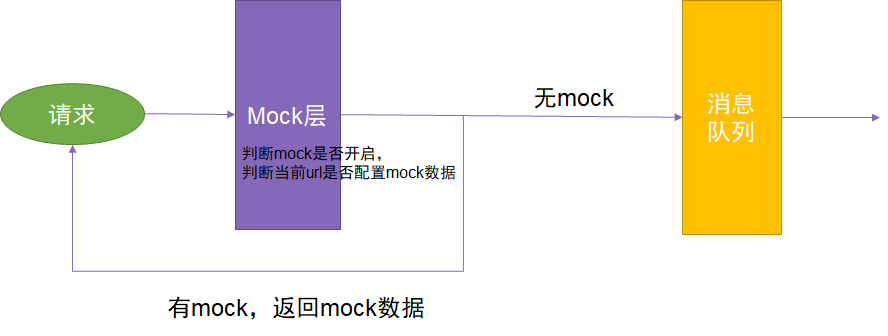
1
2
3
4
5
6
7
8
9
10
11
12
13
14
15
16
17
18
19
20
21
22
23
24
25
26
27
28
29
30
31
32
33
34
35
36
37
38
39
40
41
42
43
44
45
46
47
48
49
50
51
52
53
54
55
56
57
58
59
60
61
62
63
64
65
66
67
68
69
70
71
72
73
74
75
76
77
78
79
80
81
82
83
84
85
86
87
88
89
90
91
92
93
94
95
96
97
98
99
100
101
// Mock.js
const mock = url => {
console.log('mock: ' + url)
return data[url]()
}

const mockData = (res, err = {}) => {
if (res) {
return Promise.resolve(res)
} else {
return Promise.reject(err)
}
}

const chars = ['a', 'b', 'c', 'd', 'e', 'f', 'g', 'h', 'i', 'j', 'k', 'l', 'm', 'n', 'o', 'p', 'q', 'r', 's', 't', 'u', 'v', 'w', 'x', 'y', 'z', 'A', 'B', 'C', 'D', 'E', 'F', 'G', 'H', 'I', 'J', 'K', 'L', 'M', 'N', 'O', 'P', 'Q', 'R', 'S', 'T', 'U', 'V', 'W', 'X', 'Y', 'Z']
// const nums = ['0', '1', '2', '3', '4', '5', '6', '7', '8', '9']
// const charAndNums = [...chars, ...nums]

const shuffle = arr => {
const copy = [...arr]
copy.sort((a, b) => Math.random() - 0.5)
return copy
}
const pick = (arr, count = 1) => {
const shuffleArr = shuffle(arr)
return shuffleArr.slice(0, count)
}
const Random = {
number: (min, max) => {
return min + Math.random() * (max - min)
},
array: (obj, min = 0, max = 10) => {
const res = []
for (let i = 0; i < Random.number(min, max) - 1; i++) {
if (typeof obj === 'function') {
res.push(obj())
} else {
res.push(obj)
}
}
return res
},
id: () => {
return Math.random().toString().slice(2)
},
string: (min = 2, max = 10) => {
let str = ''
for (let i = 0; i < Random.number(min, max) - 1; i++) {
str += pick(chars)
}
return str
},
image: (size = '200x100', str = '') => {
return `http://via.placeholder.com/${size}?text=${str || size}`
},
sentence: (min = 2, max = 30) => {
const arr = []
for (let i = 0; i < Random.number(min, max) - 1; i++) {
arr.push(Random.string())
}
return arr.join(' ') + '.'
},
color: () => {
return '#' + (Math.random() * 0xffffff << 0).toString(16)
},
}

const data = {

// 埋点是否启用
'/common/enableBigData': () => mockData({
'code': '10000', 'msg': '成功', 'count': 0, 'obj': true
}),

// 埋点
// '/hcz/burydata': () => mockData({ 'msg': 'success', 'code': '10000' }),

// 获取uid
// '/user/queryUid': () => mockData({
// 'code': '10000',
// 'msg': '成功',
// 'count': 0,
// 'obj': { 'gyuserId': '2088402147755067', 'gyuserPhoneNumber': null, 'gyuserAname': '王昊', 'gyuserRname': null, 'imgUrl': 'https://tfs.alipayobjects.com/images/partner/T1aTJqXcJaXXXXXXXX', 'gyuserSex': 'm', 'gyuserBirthday': null, 'gyuserCid': null, 'gyuserProvinceCode': '浙江省', 'gyuserCityCode': '杭州市', 'gyuserStatus': null, 'outUid': '2088402147755067', 'outPlatformId': 1, 'fromSource': null, 'activityId': null, 'taskId': null, 'timeToMonthEnd': 0 }
// }),

// 获取是否启用大数据
// '/common/enableBigData': () => mockData({
// code: '10000',
// count: 0,
// msg: '成功',
// obj: false,
// }),

}

module.exports = {
// enable: true,
data,
mock,
}

1
2
3
4
5
6
7
8
9
10
11
12
13
14
15
16
17
18
19
20
21
22
23
24
25
26
27
28
29
30
31
32
33
34
35
36
37
const MAX_COUNT = 5
const Mock = require('./Mock.js')

class Alipay {
static locking = false
static queue = []
static subQueue = []
static count = 0

// 收到请求,放到队列
static http (options = {}) {
// 判断是否使用mock
if (Mock.enable && Mock.data && Mock.data[options.url]) {
return Mock.mock(options.url)
}

return new Promise((resolve, reject) => {
let inQueue = this.queue
if (options.subQueue) {
inQueue = this.subQueue
} else if (this.locking) {
inQueue = this.lockQueue
}
this.queue.push({
options,
success: (res) => {
resolve(res)
},
fail: (err) => {
reject(err)
}
})
this.walk()
})
}
}

说明:测试了在小程序开发工具中新增的anymock功能,发现可实现相同的功能,针对部分接口做mock拦截。且该网页支持mockjs语法,建议使用anymock来做,减少前端代码体积。