在小程序中尝试引入jest进行简单的单元测试。
安装
配置
在package.json添加test命令,执行jest;
在项目根目录新建test目录,用于存放test文件;
在根目录增加jest.config.js文件,设置jest配置。配置文档
配置问题
新建一个测试文件。直接运行yarn test可以运行。但是使用es modules的import和export方法会报错。上网查阅解决办法,说是要用babel,但是尝试了几种方案都报错,要注意babel的版本。按照官网建议jest配置文件设置用babel-jest进行transform,babel配置如下解决:
1
2
3
4
|
module.exports = {
presets: [['@babel/preset-env', { targets: { node: 'current' } }]],
}
|
另外一个问题是引用模块的路径问题。我们项目的根路径是/,源代码根路径是/src,测试文件根路径是/test。当我们在test文件中import src的文件时,路径可以自己写相对路径,但是src的js文件可能又import了其他文件,此时的根路径是/src,就是导致jest报错找不到模块。解决方法是在配置文件设置roots第一项为src目录,此时执行test命令搜索不到测试文件,所以增加testMatch设置检测test目录下的文件。
另外import的文件中带入了大量console,在jest命令增加–silent可以去掉,成功时正常显示,失败时依然会打印错误信息。
语法
新建一个xx.test.js或者xx.spec.js文件。通过describe来编写测试分组,用it来编写用例测试名称,然后通过expect编写断言。
如:
1
2
3
4
5
6
7
8
9
10
11
12
13
14
15
16
17
18
19
20
21
22
23
24
25
| import { qs, formatDate } from '@/utils/tool'
describe('测试qs', () => {
it('测试stringify', () => {
const foo = { a: 1, b: 2 }
expect(qs.stringify(foo)).toBe('a=1&b=2' || 'b=2&a=1')
})
it('测试parse', () => {
expect(qs.parse('a=1&b=2')).toEqual({ a: '1', b: '2' })
})
})
describe('测试formatDate', () => {
it('测试默认', () => {
const time = new Date('2020-11-10')
expect(formatDate(time)).toBe('2020-11-10 08:00:00')
})
it('测试格式', () => {
const time = new Date('2020-11-10 00:00:00')
expect(formatDate(time, 'MM-DD')).toBe('11-10')
})
})
|
断言时可使用一系列api方法:
- toBe
- toEqual
- toBeNull
- toBeUndefined
- toBeDefined
- toBeTruthy
- toBeFalsy
- toBeGreaterThan
- toBeGreaterThanOrEqual
- toBeLessThan
- toBeLessThanOrEqual
- toMatch
- toContain
- toThrow
还可以通过.not去取反。
jest中支持在回调函数,promise,async/await使用断言。
用jest.fn包装一个函数,可以通过.mock获取函数的各种属性,也可以通过其他mock api来mock返回值。
jest可以通过配置文件给所有js加载一个预先执行的js文件,下面我们将用到。
小程序使用
我们要测试小程序的代码,最大的问题在于执行一些小程序的api会报错,如App()、Page()、Coponent()、getCurrentPages()、getApp(),以及一系列my方法。因此我们需要模拟实现这些函数,并放到setup执行。
1
2
3
4
5
6
7
8
9
10
11
12
13
14
15
16
17
18
19
20
21
22
23
24
25
26
27
28
29
30
31
32
33
34
35
36
37
38
39
40
41
42
43
44
45
46
47
48
49
50
51
52
53
54
55
56
57
58
59
60
61
62
63
64
65
66
67
68
69
70
71
72
73
74
75
76
77
78
79
80
81
|
class MyApp {
    constructor (options) {
        this.globalData = {}

        for (const key in options) {
            this[key] = options[key]
        }
    }
}

function App (options) {
    if (global._my.app == null) {
        global._my.app = new MyApp(options)
    }
}

class MyPage {
    constructor (options) {
        this.data = options.data || {}
        for (const key in options) {
            if (key !== 'data') {
                this[key] = options[key]
            }
        }
    }

    setData (newData, cb) {
        setTimeout(() => {
            Object.assign(this.data, newData)
            cb && cb()
        })
    }
}

function Page (options) {
    global._my.page = new MyPage(options)
}

class MyComponent {
    constructor (options) {
        this.data = options.data || {}
        for (const key in options) {
            if (key !== 'data') {
                this[key] = options[key]
            }
        }
    }

    setData (newData, cb) {
        setTimeout(() => {
            Object.assign(this.data, newData)
            cb && cb()
        })
    }
}

function Component (options) {
    global._my.component = new MyComponent(options)
}

global._my = {
    app: null,
    page: null,
    component: null,
}
global.App = App
global.Page = Page
global.Component = Component
global.getApp = () => global._my.app
global.getCurrebtPage = () => [global._my.page]

global.my = {
    showLoading: jest.fn(),
    hideLoading: jest.fn(),
    showModal: jest.fn(),
    request: jest.fn(),
    getStorageSync: jest.fn(),
    showShareMenu: jest.fn(),
}
|
运行结果:
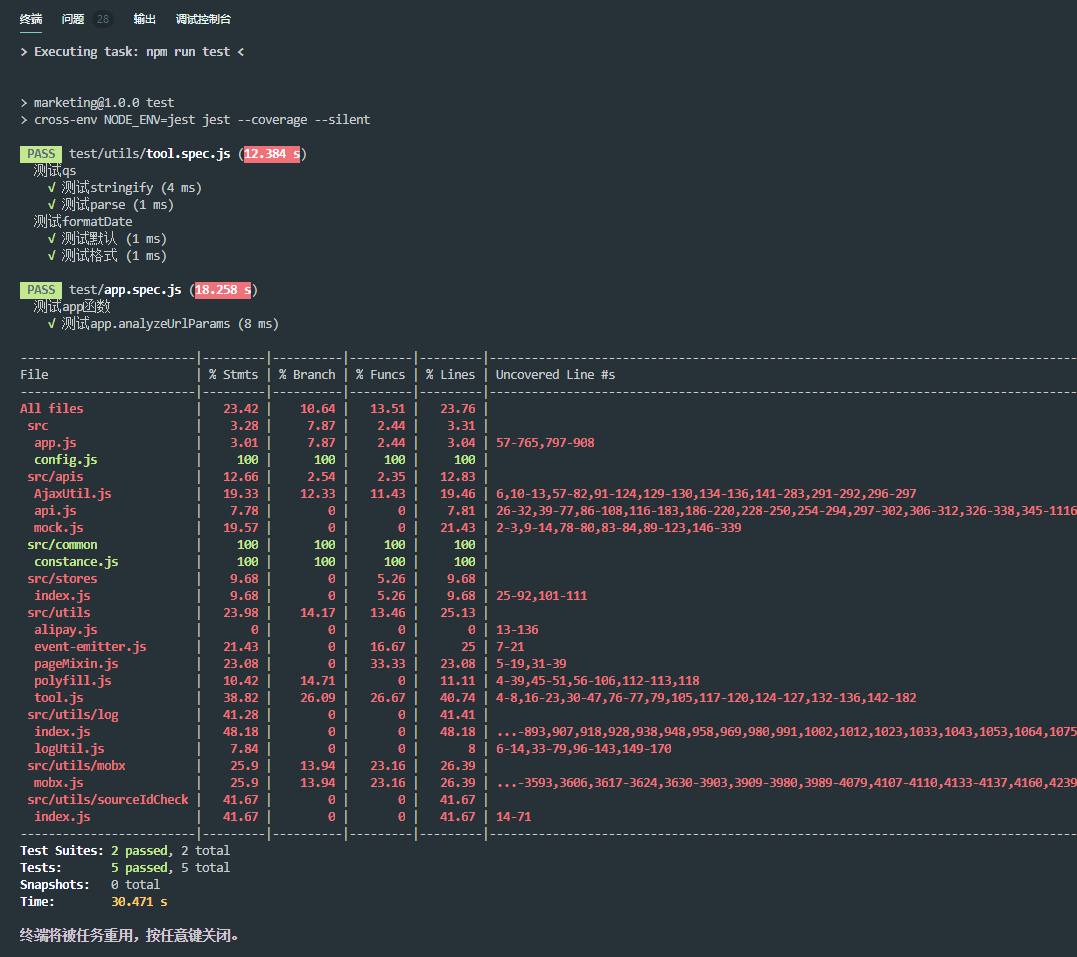
最终配置
package.json:
1
2
3
4
5
6
7
8
9
10
11
12
13
14
15
16
17
18
| {
"scripts": {
"test": "cross-env NODE_ENV=jest jest --coverage --silent",
},
"devDependencies": {
"@babel/core": "^7.13.10",
"@babel/node": "^7.13.12",
"@babel/plugin-proposal-export-default-from": "^7.12.13",
"@babel/plugin-transform-modules-commonjs": "^7.13.8",
"@babel/plugin-transform-runtime": "^7.13.10",
"@babel/preset-env": "^7.13.12",
"@babel/preset-es2015": "^7.0.0-beta.53",
"babel-core": "^7.0.0-bridge.0",
"babel-jest": "^26.6.3",
"canvas": "^2.7.0",
"jest": "^26.6.3"
}
}
|
jest.config.js配置文件如下:
1
2
3
4
5
6
7
8
9
10
11
12
13
14
15
16
17
18
19
20
21
22
23
24
25
26
27
28
29
30
31
32
33
34
35
36
37
38
39
40
41
|
module.exports = {
verbose: true,
roots: ['<rootDir>/src', '<rootDir>/test'],
setupFiles: [
'<rootDir>/test/my.js'
],
moduleFileExtensions: [
'ts',
'js',
],
moduleDirectories: [
'node_modules',
],
moduleNameMapper: {
'^@/test$': '<rootDir>/test/index.js',
'^@/test/(.*)$': '<rootDir>/test/$1',
'^@/(.*)$': '<rootDir>/src/$1',
'^/(.*)$': '<rootDir>/src/$1',
},
transformIgnorePatterns: ['node_modules', 'dist'],
testMatch: [
'<rootDir>/test/**/*.spec.js',
'<rootDir>/test/**/*.test.js',
],
transform: {
'^.+\\.(js?)$': 'babel-jest'
},
}
|