可以用let’s encrypt的免费https证书,但是每三个月要续签一次。这里让claude code写一个自动续签的脚本,用到certbot。
token申请
我们的域名服务器已经托管给cloudflare了。这里需要在cloudflare创建一个token,用这个token的权限去续订。
获取 Cloudflare API Token
- 登录 Cloudflare Dashboard
(https://dash.cloudflare.com/profile/api-tokens)
- 点击左侧 My Profile → API Tokens(或直接访问上面的链接)
- 点击 Create Token
- 找到 “Edit zone DNS” 模板,点击右侧 Use template
- 配置:
- Permissions: 保持默认(Zone → DNS → Edit)
- Zone Resources: 选择 All zones(或指定 ahao430.site)
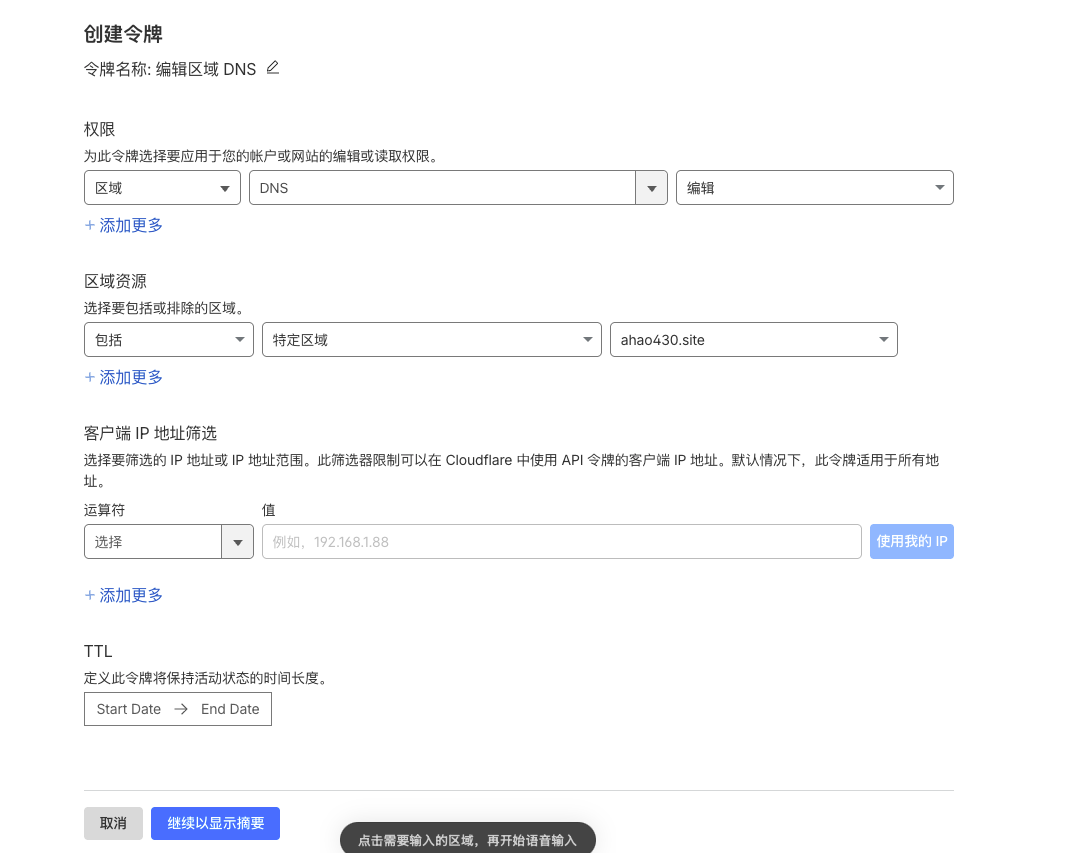
- 点击 Continue to summary → Create Token
- 复制生成的 Token(只显示一次)

AI配置
然后把这个token给到claude code,让他用certbot做自动续订。
手动配置
Certbot + Cloudflare DNS 自动签发 SSL 证书
环境: Ubuntu 24.04 LTS | Nginx | 泛域名证书 | Let’s Encrypt
一、安装 Certbot
1
| apt update && apt install -y certbot python3-certbot-dns-cloudflare
|
包含 Cloudflare DNS 插件,用于 DNS-01 验证方式签发泛域名证书。
二、申请 Cloudflare API Token
- 登录 Cloudflare Dashboard
(https://dash.cloudflare.com/profile/api-tokens)
- 点击 My Profile → API Tokens
- 点击 Create Token
- 找到 “Edit zone DNS” 模板,点击 Use template
- Permissions 保持默认 (Zone → DNS → Edit),Zone Resources 选 All
zones(或指定具体域名)
- 点击 Continue to summary → Create Token
- 复制生成的 Token(只显示一次)
验证 Token 是否有效:
1
2
| curl -s "https://api.cloudflare.com/client/v4/user/tokens/verify" \
-H "Authorization: Bearer <你的Token>"
|
返回 “status”:”active” 即为有效。
三、配置 Cloudflare 凭证文件
1
2
3
4
5
6
7
| mkdir -p /root/.secrets/certbot
cat > /root/.secrets/certbot/cloudflare.ini << 'EOF'
dns_cloudflare_api_token = <你的Token>
EOF
chmod 600 /root/.secrets/certbot/cloudflare.ini
|
▎ ⚠️ 权限必须是 600,certbot 检测到权限过宽会拒绝运行。
四、申请证书
首次签发泛域名证书
1
2
3
4
5
6
7
8
9
| certbot certonly \
--dns-cloudflare \
--dns-cloudflare-credentials /root/.secrets/certbot/cloudflare.ini \
-d "*.ahao430.site" \
-d "ahao430.site" \
--server https://acme-v02.api.letsencrypt.org/directory \
--key-type ecdsa \
--agree-tos \
--email your-email@example.com
|
参数说明:
1
2
3
4
5
6
7
8
9
10
11
12
13
14
15
16
17
18
19
| ┌────────────────────────────────────┬─────────────────────────────┐
│ 参数 │ 说明 │
├────────────────────────────────────┼─────────────────────────────┤
│ --dns-cloudflare │ 使用 Cloudflare DNS 插件 │
├────────────────────────────────────┼─────────────────────────────┤
│ --dns-cloudflare-credentials │ 凭证文件路径 │
├────────────────────────────────────┼─────────────────────────────┤
│ -d "*.ahao430.site" -d │ 泛域名 + 主域名 │
│ "ahao430.site" │ │
├────────────────────────────────────┼─────────────────────────────┤
│ --server │ ACME v2 端点(泛域名必须用 │
│ │ v2) │
├────────────────────────────────────┼─────────────────────────────┤
│ --key-type ecdsa │ 使用 ECDSA 密钥(更短更快) │
├────────────────────────────────────┼─────────────────────────────┤
│ --agree-tos │ 同意服务条款 │
├────────────────────────────────────┼─────────────────────────────┤
│ --email │ 用于接收过期提醒通知 │
└────────────────────────────────────┴─────────────────────────────┘
|
签发成功后证书文件位于:
1
2
3
4
5
| /etc/letsencrypt/live/ahao430.site/
├── cert.pem # 证书
├── chain.pem # 中间证书
├── fullchain.pem # 完整证书链(nginx 使用这个)
└── privkey.pem # 私钥
|
五、Nginx 配置 SSL
基础 HTTPS 配置
1
2
3
4
5
6
7
8
9
10
11
12
13
14
15
16
17
18
19
20
21
22
23
24
25
26
27
28
29
30
| # HTTP 跳转 HTTPS
server {
listen 80;
listen [::]:80;
server_name ahao430.site;
return 301 https://$host$request_uri;
}
# HTTPS 主配置
server {
listen 443 ssl;
listen [::]:443 ssl;
server_name ahao430.site;
ssl_certificate /etc/letsencrypt/live/ahao430.site/fullchain.pem;
ssl_certificate_key /etc/letsencrypt/live/ahao430.site/privkey.pem;
ssl_protocols TLSv1.2 TLSv1.3;
ssl_session_timeout 1d;
ssl_session_cache shared:SSL:10m;
location / {
proxy_pass http://127.0.0.1:3000;
proxy_http_version 1.1;
proxy_set_header Host $host;
proxy_set_header X-Real-IP $remote_addr;
proxy_set_header X-Forwarded-For $proxy_add_x_forwarded_for;
proxy_set_header X-Forwarded-Proto https;
}
}
|
泛域名反代多个子域名
1
2
3
4
5
6
7
8
9
10
11
12
13
14
15
16
17
18
| # cpa.ahao430.site
server {
listen 443 ssl;
server_name cpa.ahao430.site;
ssl_certificate /etc/letsencrypt/live/ahao430.site/fullchain.pem;
ssl_certificate_key /etc/letsencrypt/live/ahao430.site/privkey.pem;
ssl_protocols TLSv1.2 TLSv1.3;
location / {
proxy_pass http://127.0.0.1:8317;
proxy_http_version 1.1;
proxy_set_header Host $host;
proxy_set_header X-Real-IP $remote_addr;
proxy_set_header X-Forwarded-For $proxy_add_x_forwarded_for;
proxy_set_header X-Forwarded-Proto https;
}
}
|
其他子域名同理,改 server_name 和 proxy_pass 即可
一张泛域名证书 *.ahao430.site
覆盖所有子域名,无需为每个子域名单独申请。
验证配置并重载:
1
| nginx -t && systemctl reload nginx
|
六、配置自动续订
Certbot 安装后自带 systemd 定时器,每天运行 2 次,证书到期前 30
天自动续订。
启用定时器
1
2
| systemctl enable certbot.timer
systemctl start certbot.timer
|
查看定时器状态:
1
| systemctl status certbot.timer
|
配置续订后自动重载 Nginx
1
2
3
4
5
6
7
8
9
10
| cat > /etc/letsencrypt/renewal-hooks/deploy/reload-nginx.sh << 'EOF'
#!/bin/bash
# Reload nginx after successful certificate renewal
if systemctl is-active --quiet nginx; then
systemctl reload nginx
echo "nginx reloaded after certificate renewal"
fi
EOF
chmod +x /etc/letsencrypt/renewal-hooks/deploy/reload-nginx.sh
|
测试自动续订
出现 Congratulations, all simulated renewals succeeded 即为配置正确。
手动续订
七、常用命令速查
1
2
3
4
5
6
7
8
9
10
11
12
13
14
15
16
17
18
| ┌────────────────────────────────────┬──────────────────────────────┐
│ 命令 │ 说明 │
├────────────────────────────────────┼──────────────────────────────┤
│ certbot certificates │ 查看所有已签发证书及到期时间 │
├────────────────────────────────────┼──────────────────────────────┤
│ certbot renew --dry-run │ 模拟续订(不实际更新证书) │
├────────────────────────────────────┼──────────────────────────────┤
│ certbot renew │ 手动续订所有即将到期的证书 │
├────────────────────────────────────┼──────────────────────────────┤
│ certbot revoke --cert-name │ 吊销证书 │
│ ahao430.site │ │
├────────────────────────────────────┼──────────────────────────────┤
│ certbot delete --cert-name │ 删除证书 │
│ ahao430.site │ │
├────────────────────────────────────┼──────────────────────────────┤
│ systemctl status certbot.timer │ 查看自动续订定时器状态 │
└────────────────────────────────────┴──────────────────────────────┘
|
八、注意事项
- Let’s Encrypt 证书有效期 90 天,到期前 30 天自动续订
- Cloudflare API Token 务必妥善保管,泄露可被用于修改 DNS 记录
- 凭证文件 /root/.secrets/certbot/cloudflare.ini 权限保持 600
- 续订后 nginx 会通过 deploy hook 自动 reload,无需手动操作
- 如果更换了服务器,记得在 Cloudflare 重新生成 Token 并更新凭证文件